
Before you open the service door
Find the unit model, controller manual and the label on the core if it is visible without unauthorized disassembly. Confirm that the owner’s manual permits access to the component. If you cannot identify the core or find the instructions, stop at external observation and ask the manufacturer or installer.
Turn the unit off and disconnect or isolate its power as directed by the manual before owner maintenance. A wall control in “off” is not necessarily electrical isolation. Use specified protective equipment. Do not access electrical compartments, motors, wiring, fuses or sealed parts.
FIGURE 3 · OWNER ACCESS IS COMPONENT-SPECIFIC
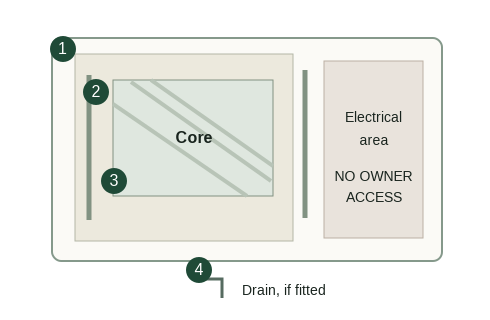
Source: Broan: ERV70 / HRV80 / HRV90 owner’s manual; Lifebreath: residential HRV owner’s manual (2025); CMHC: maintaining a heat recovery ventilator.
Choose the method by part, not by cabinet appearance
Filters: cleanable or replace-only?
Find the correct filter instructions and replacement specification. Do not wash disposable media or install a higher-resistance filter because it fits physically. Follow removal direction and drying requirements.
Core: HRV, ERV and the exact label
Check whether removal is permitted and whether the specified method is vacuuming, rinsing, washing or service by a technician. Never assume that a filter-washing instruction applies to the core. Do not add cleaners, disinfectant, pressure washing or heat drying unless that exact procedure is authorized.
Outside hoods: visible obstructions
Check safely reachable hoods for leaves, snow, lint or frost. Keep the installed guards in place. Use a technician if reaching the hood would require unsafe access or disassembly.
Drain: only if one is fitted
Look for visible kinks, blockage or leakage and follow the model’s permitted drain-care procedure. Some units have different condensate arrangements. Do not add a drain, change a trap or reroute tubing from this general guide.
Reassembly: orientation and dry time matter
Follow the manual’s reassembly and drying requirements before restoring power. Then check for normal operation and leaks.
Source: Broan: ERV70 / HRV80 / HRV90 owner’s manual; Fantech: VER150 installation and operation manual; Lifebreath: residential HRV owner’s manual (2025); CMHC: maintaining a heat recovery ventilator.
Why two similar units can need different care
Broan ERV70S / ERV70T
For the energy-recovery cores covered by this manual, remove dust with a vacuum and soft brush attachment. The same manual’s annual lukewarm-water and mild-soap method is for the heat-recovery cores in its listed HRV80S, HRV80T, HRV90S and HRV90T models, not the ERV70S or ERV70T. Check the core label and keep filter care separate.
Fantech VER150
The named ERV manual permits clean tap water through the core faces, then the specified drying procedure. This is why “never wash an ERV core” is not a safe universal rule.
Lifebreath residential HRVs
Standard-core and RNC 205 Plus care differ, including drying; follow the exact model’s instructions.
Source: Broan owner’s manual 22640 rev. 03, §§ 3.1–3.2, pp. 6–7 (PDF); Fantech: VER150 installation and operation manual; Lifebreath: residential HRV owner’s manual (2025).
How often should you clean it?
Use the schedule and operating restrictions in your exact manual. Inspect filters sooner if dust or outdoor conditions are loading them during permitted operation. Filter reminders and calendar intervals do not establish that the core needs the same treatment.
Broan’s ERV70S/70T and HRV80S/80T/90S/90T manual prohibits operation during construction, renovation or drywall sanding; extra cleaning does not replace this restriction.
Examples, not a universal calendar:
- Broan 22640 rev.03: quarterly filter care and core vacuuming, plus annual model-specific core maintenance (pages 6–7).
- Lifebreath’s 2025 manual: filters quarterly; the core schedule is labelled “Biennially” (every two years; pages 14–16).
- CMHC’s general guide: clean or replace filters every two months. Your equipment manual determines the applicable method and schedule.
The filter interval and the core interval may differ. Use the instructions for the exact model and component.
Record the date, component, method used and the next inspection date from your instructions. If the manual uses an unclear interval or gives conflicting instructions, ask the manufacturer rather than guessing. A maintenance visit is also a chance to note unusual ice, water, noise or airflow without adjusting the system.
Source: CMHC: maintaining a heat recovery ventilator; Broan owner’s manual 22640 rev. 03, pp. 6–7 (maintenance; PDF), p. 2 (construction restriction); Lifebreath: residential HRV owner’s manual (2025), pages 14–16.
Create a printable maintenance record
Fill in only what you have verified. Copy or print before leaving; the page does not retain your entries.
My unit’s maintenance instructions
Copy the method from your exact manual, then log what you did. This is a record, not an automated cleaning prescription. Nothing is saved or sent.
Your maintenance record
Blank or unconfirmed entries are not permission to clean.
When cleaning is not the next step
Where are you seeing water?
- Near a cord, outlet or wiring: Keep clear. Do not touch the unit, plug or nearby controls. Arrange qualified help; follow the emergency advice below if there is smoke, fire or a carbon monoxide alarm.
- At the unit, on the floor, at a room grille, or returning as ice: Arrange service, even if you can see water flowing through the drain. A wet room grille or a water stain nearby is not the same as window condensation. Do not open the cabinet or duct to trace it. From a safe spot, note the location and when it appeared for the installer or building manager.
- Only in the intended drain line or pan, if fitted: Water on this path can be part of normal operation or defrost. Check the exact manual; visible drain flow does not rule out a fault. If it backs up, escapes the cabinet or icing persists, arrange service.
- Only on the inside of a window: This is a different check, not evidence that the unit is leaking. See the winter window condensation checks.
Not sure where it starts? Do not open the unit to find out. Note what you can see safely and ask the installer or building manager.
Source: Health Canada: ventilation and the indoor environment.
Evacuate and call local emergency services from a safe place. Do not stay inside to adjust ventilation. For other electrical or water hazards, stop using the unit, keep clear and arrange qualified help. Isolate power only if safe. Do not reach into the cabinet to investigate.
Contact the installer for recurring faults, persistent core icing, pooling water, a damaged core, inaccessible ducts or weak airflow that remains after authorized care. A professional can check airflow balance, controls and the drain or duct installation. Those checks are different from owner filter maintenance.
Keep a photo of the model label, fault display and safely visible problem for the service call. Do not remove guards, force frozen components, rebalance dampers or disable defrost to make symptoms disappear.
Source: Fantech: VER150 installation and operation manual; Broan: ERV70 / HRV80 / HRV90 owner’s manual; Lifebreath: residential HRV owner’s manual (2025).
Sources and scope
Read the sources and limits
Checked November 9, 2026. General guidance for English-speaking homeowners; the exact equipment manual and local requirements govern an individual system. Manufacturer examples apply only to the named models.
- Broan: ERV70 / HRV80 / HRV90 owner’s manual
- Fantech: VER150 installation and operation manual
- Lifebreath: residential HRV owner’s manual (2025)
- CMHC: maintaining a heat recovery ventilator
The illustrations are original explanatory schematics, not installation drawings. No claim of measured performance, code compliance, or universal operating settings is made for your home.